Why it mattersEasy to forget. Easy to fix.
On a busy day, water is one of the first things to slip. A goal you can see, a gentle pace check and a reminder you can answer in one tap make it much easier to keep up.
Because it lives in the same app as your steps, Steply's automatic goal adds a little extra on days you walk more.
Adaptive goal
Based on your weight in Apple Health, plus an allowance for your steps.
Effortless logging
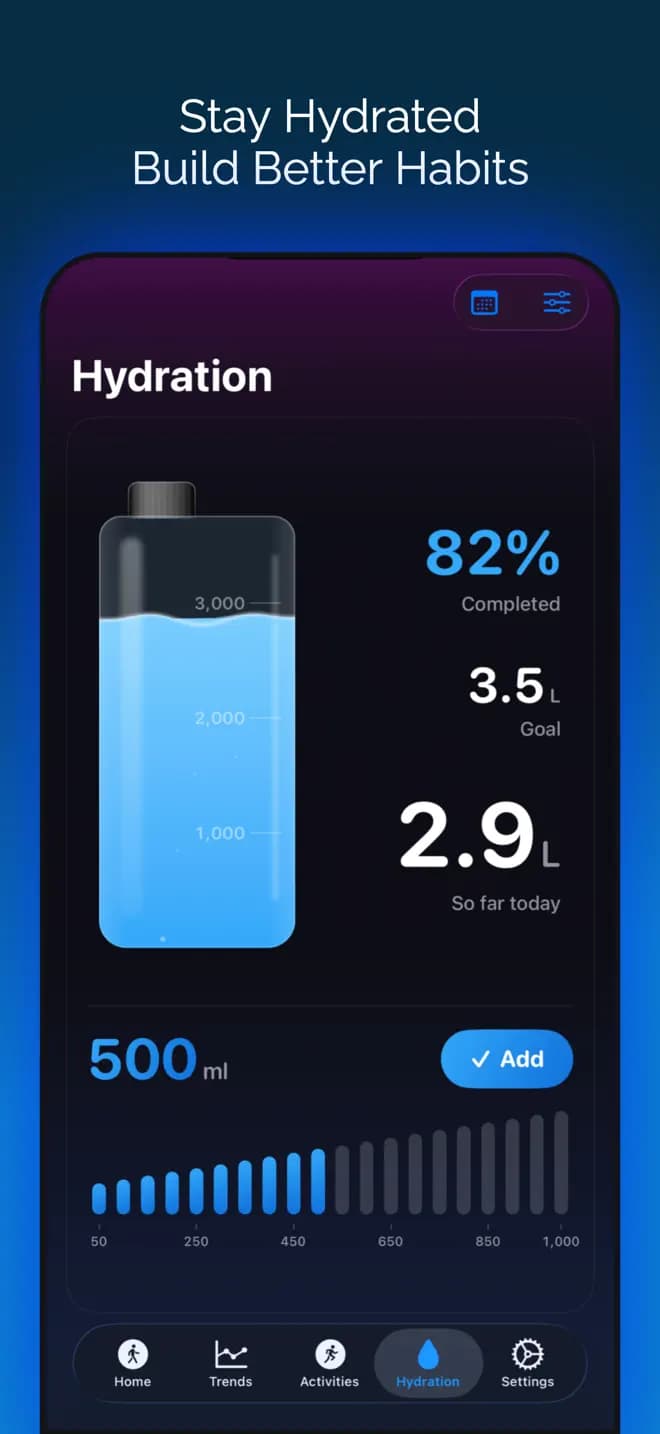
Slide to an amount and tap Add, on iPhone, widget or Watch.
One record
Saved to Apple Health, where water from other apps counts too.
Automatic daily water goalA goal that adapts.
Turn on Automatic Goal and Steply uses about 35 ml per kilogram of your latest weight in Apple Health, plus 100 ml for every 1,000 steps above 4,000 (up to 800 ml extra), kept between 1 and 5 litres. It's general guidance, not medical advice.
Prefer your own number? Set a manual goal any time, and switch back with “Use recommended”. Measure in millilitres or fluid ounces.
Logging water and staying on paceLog in a second. See if you're on track.
Slide to an amount and press Add; the next time, Steply remembers your last amount. A dashed pace line on the bottle shows where you should be by now (“On track for today” or how far behind), and Undo is there if you tap by mistake.
Fine increments
Turn on Water Increments for 25 ml or 1 oz steps, perfect for small glasses and cups.
Hydration streak
The Home card shows your progress, what's left and your hydration streak.
History
A calendar of every day, with monthly total, daily average, goals met, days logged and your best day.
Water remindersReminders you can answer.
Choose the times you want a nudge; six are suggested, from 8:00 to 20:30. Each notification shows how much is left, and you can log a drink straight from it or ask to be reminded in 30 minutes. Once you reach your goal, the rest of that day's reminders are skipped.
Water logging on Apple Watch and widgetsOn your wrist and Home Screen.
Log water on Apple Watch with the Digital Crown, or without opening any app at all: the Water Quick Add complication adds your last amount, and the Log Water card in the Smart Stack has a button for each drink size. On iPhone, the medium Hydration widget logs in place on iOS 17 and later, and Water Progress sits on your Lock Screen.
Water data in Apple HealthBuilt on Apple Health.
Every drink is saved to Apple Health as water. Water logged anywhere else, in the Health app, by Siri or by another app, counts toward your Steply goal too, and is marked “From Apple Health” in your history.
Questions about water tracking
How is the automatic water goal calculated?
About 35 ml per kilogram of your latest Apple Health weight, plus 100 ml for every 1,000 steps above 4,000 (up to 800 ml), kept between 1 and 5 litres. It's general guidance. Set your own goal if you've been given one.
Does water logged in other apps count?
Yes. Steply reads all water in Apple Health, so water from the Health app, Siri or other apps counts toward your goal.
Can I log water from a notification or widget?
Yes. Reminders have a Log button, the medium Hydration widget logs in place on iOS 17 and later, and Apple Watch has Water Quick Add and Log Water complications.
Will reminders keep coming after I hit my goal?
No. Once you reach your goal, the rest of that day's reminders are skipped.
Works well with.
Widgets & Live Activities
Ten Home and Lock Screen widgets, one-tap water logging and a Live Activity for every workout.
Learn more ›Apple Watch
A full watchOS app: today's progress, GPS workouts, Japanese walking, water and 49 complications.
Learn more ›Apple Health Integration
Exactly what Steply reads from Apple Health, what it saves back, and why it never writes step counts.
Learn more ›