Why it mattersSee where you sped up, slowed down and pushed through.
A finished route is a static line. Replaying it reveals the shape of your effort: the hill that slowed you, the stretch where you found your rhythm, the final push home.
And when you've done something you're proud of, a replay video says more than a screenshot ever could.
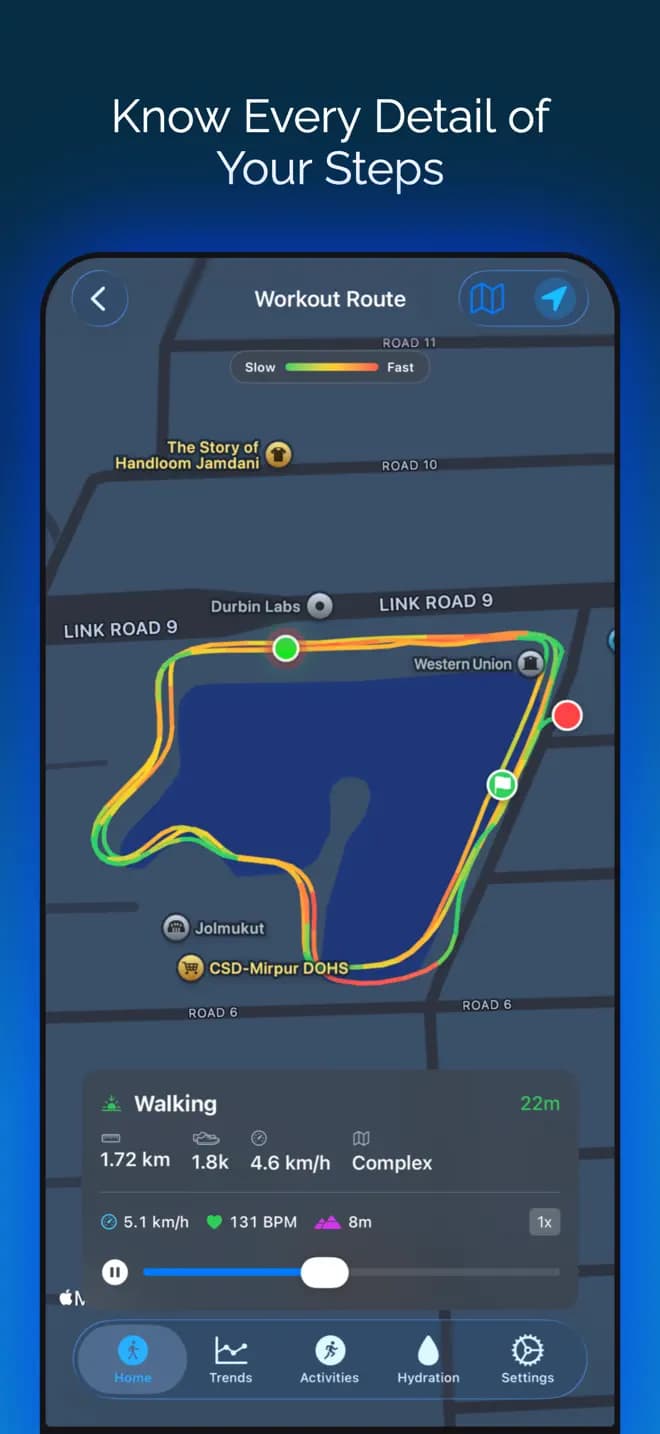
Understand your pace
Speed coloring and live readouts show exactly where your pace changed.
Relive the moment
Smooth playback with motion and zoom camera modes.
Share it beautifully
A vertical video ready for Stories, in two styles.
Replay controls and the speed-colored routeA replay with the details that matter.
Play, pause and scrub through any workout at 0.5×, 1×, 2× or 4× speed. The route is drawn green through yellow to red by speed, with a Slow–Fast legend, while live speed, heart rate (BPM) and elevation update as the marker moves.
Switch between Motion and Zoom camera modes, and choose Standard, Muted Standard, Satellite or Hybrid maps.
Exporting a route replay videoReplay videos, ready for Stories.
Export a vertical 1080×1920 video at 30 fps. Its length scales with your distance, from 15 to 45 seconds, and it includes live distance, duration and speed counters, your steps and calories at the end, and the speed key.
Classic or Clean
Two layouts to match your style.
Live BPM
Show heart rate in the video when the workout has heart-rate data.
Share anywhere
Post straight to Instagram Stories, save to Photos, copy or share.
Stats cards, posters and GPX exportMore ways to share.
Every workout also has a Stats card and a Poster you can save or share, plus GPX export for your route.
Questions about route replay
What do the route colors mean?
Speed. The route goes from green (slower) through yellow to red (faster), and a Slow–Fast legend is shown on the map.
Which playback speeds are available?
0.5×, 1×, 2× and 4×, with play, pause and scrubbing.
What format is the replay video?
A vertical 1080×1920 MP4 at 30 fps, between 15 and 45 seconds long depending on distance, in Classic or Clean style.
Works well with.
GPS Workouts
Record walks, runs, hikes and rides with a carefully filtered GPS route, saved to Apple Health.
Learn more ›Insights & Analytics
Consistency Score, activity clock, hourly patterns and side-by-side comparisons across weeks, months and years.
Learn more ›Apple Watch
A full watchOS app: today's progress, GPS workouts, Japanese walking, water and 49 complications.
Learn more ›