Why it mattersHabits live in patterns, not totals.
Two weeks with the same total can look completely different: one steady, one a single big weekend. Seeing when and how evenly you move shows you where small changes will have the biggest effect, like a short walk in your quietest hour.
Steply turns months of Apple Health data into a few clear pictures, so you can spot your rhythms without reading spreadsheets.
Consistency
A single score for how evenly your activity is spread.
Timing
Hour-by-hour views reveal your most and least active times.
Progress
Compare any week, month or year against another.
What the Consistency Score measuresYour Consistency Score.
A score from 10 to 100 that measures how evenly your steps are spread across the days of a week or month, or across the months of a year. Steady beats spiky. Days that haven't happened yet are left out, so the score is fair mid-week.
80–100 · Excellent
A highly consistent routine.
60–79 · Good progress
Fairly consistent activity.
40–59 · Needs work
Activity varies significantly day to day.
Below 40 · Inconsistent
Time to build a steadier routine.
Steps by hour and the 24-hour Activity ClockWhen you move.
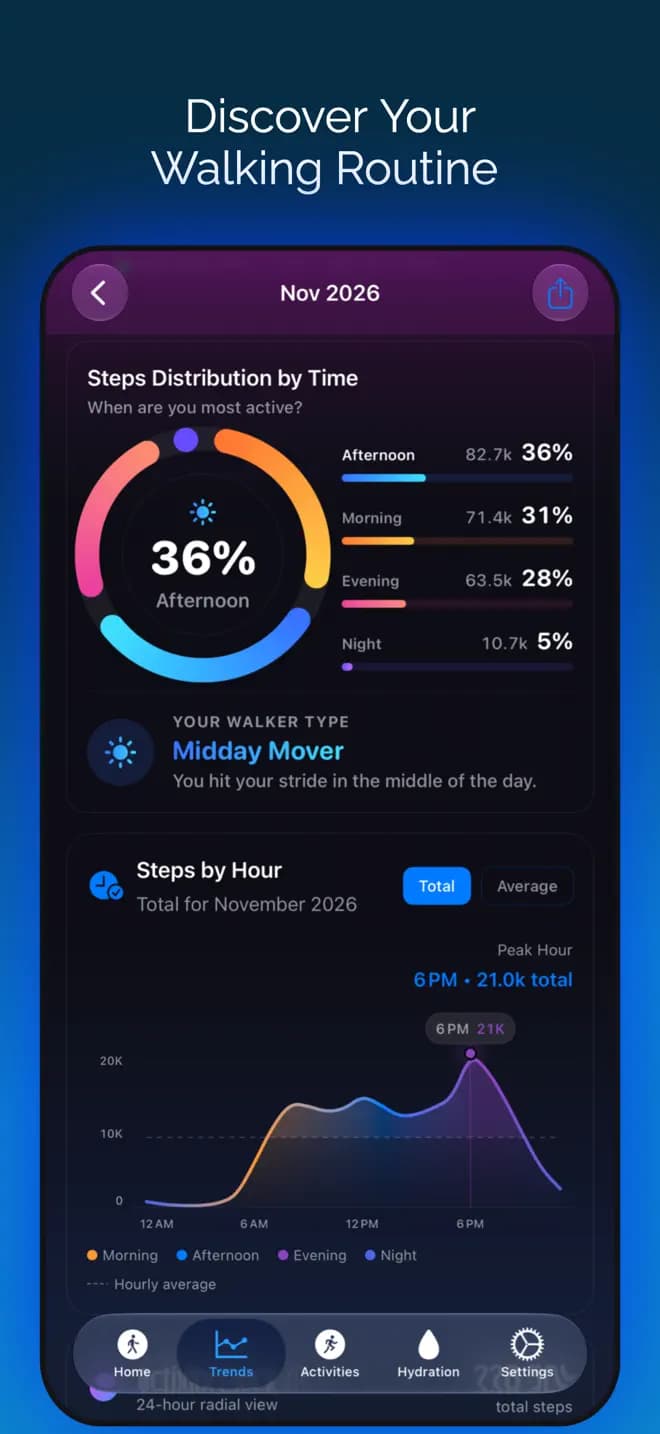
The 24-hour Activity Clock wraps your day into a single ring, so your busiest and quietest hours stand out instantly. Steps by Hour shows the same data as an average or total with your peak hour, and Steps Distribution by Time breaks your day into parts.
The Weekly Patterns heatmap goes further: seven days by 24 hours in one grid, so you can see exactly when your week comes alive.
Weekly, monthly and yearly step chartsWeek, month and year in focus.
Every period has its own detail view. Overviews and breakdowns (Weekly Breakdown for a month, Monthly Breakdown for a year) sit alongside cards like the Weekly Wave chart, Peak Performance Days and Months, and a calendar view of every day.
Monthly step recapYour monthly recap.
On the first open of a new month, Steply lets you know your recap is ready: last month's total, daily average, best day and change from the month before, plus your Consistency Score, weekly breakdown, steps by hour and a calendar of every day. Share it as an image in one tap.
Comparing weeks, months and yearsCompare anything with anything.
Trends Compare puts two periods head to head: this month against the same month last year, or this week against your best. Go back up to 104 weeks, 48 months or 10 years, for steps, distance or calories.
Head to head & The race
Summary cards showing who's ahead.
Day by day
Every number side by side, plus your weekday rhythm.
Where it changed
Pinpoints the days or weeks that made the difference.
Quick comparisons
Today vs yesterday, last week, your 7- and 30-day averages and your 30-day best.
Walking heart rate trendWalking heart rate.
With Apple Watch, Steply shows your heart rate while walking against your own 30-day baseline, a simple way to notice how your walking fitness changes over time.
Questions about insights & analytics
How do I see my step count history on iPhone?
Open Steply's Trends tab and switch between Week, Month and Year, or swipe the week strip and open the calendar on Home to revisit any day. Steply reads your full step history from Apple Health, as far back as it goes.
How do I see my monthly steps?
In Trends, choose Month to see the total, daily average, best day and change from the previous month, with a weekly breakdown and a calendar of every day.
How is the Consistency Score calculated?
It's 100 minus the coefficient of variation of your daily steps (monthly totals in the year view), kept between 10 and 100. Days that haven't happened yet aren't counted.
How far back can I compare?
Up to 104 weeks, 48 months or 10 years, limited by how far back your Apple Health data goes.
Where does the data come from?
From Apple Health on your device. Steply analyses it locally and never uploads it.
Works well with.
Step Counter & Goals
Live step count, a daily goal that fits you, streaks, 39 achievements and timely nudges.
Learn more ›GPS Workouts
Record walks, runs, hikes and rides with a carefully filtered GPS route, saved to Apple Health.
Learn more ›Widgets & Live Activities
Ten Home and Lock Screen widgets, one-tap water logging and a Live Activity for every workout.
Learn more ›