Why it mattersWhat gets measured gets moved.
It’s easy to misjudge how much you really walk. A clear daily number, and a goal sized to your real routine, turns a vague intention into something you can see, hit and build on.
Steply is designed around consistency rather than one-off big days: a streak that only counts finished days, a goal you can adjust as you improve, and reminders that arrive when they can still make a difference.
Effortless
Your iPhone and Apple Watch count steps in the background. Steply reads them from Apple Health, so there's nothing to start or stop.
Personal
Start with a goal you can actually reach, from 500 steps a day up to 100,000, and raise it as walking becomes a habit.
Motivating
Streaks, achievements and a well-timed evening nudge give you a reason to take the extra walk.
How Steply counts steps in the backgroundLive, all day.
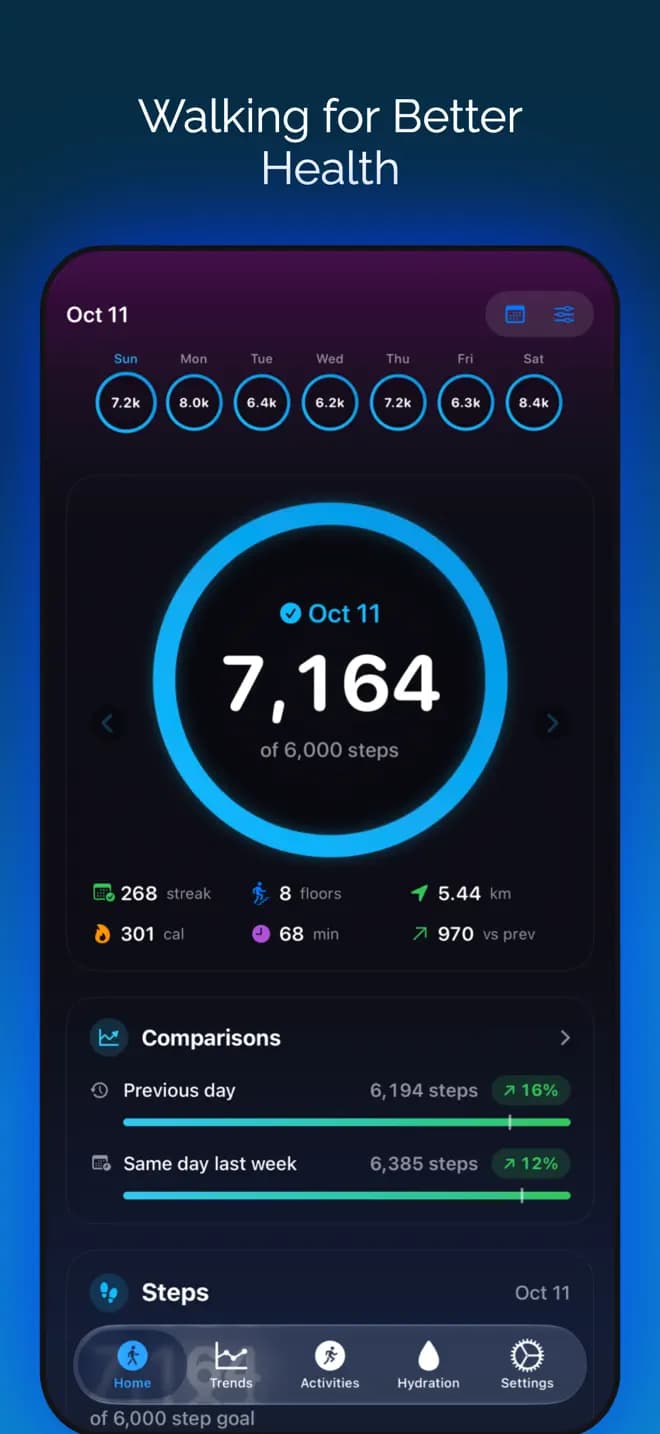
Steply listens for new step data in Apple Health and updates your ring as soon as it arrives, even in the background, so your widgets stay current too.
Under the ring you'll see your streak, floors climbed, distance, active calories, active minutes and how today compares with the previous period. Swipe the week strip or open the calendar to revisit any past day.
Setting a daily step goalA goal that fits you.
Pick a suggested goal (2,000 to 15,000 steps) or set your own anywhere from 500 to 100,000. Steply even includes a weight goal calculator that estimates a daily step target for a target weight, and can set it as your step goal in one tap.
Suggested goals
Seven presets from 2,000 to 15,000 steps for a quick start.
Custom goal
Any value from 500 to 100,000 steps, synced to Apple Watch and your widgets.
Weight goal calculator
Estimates the steps per day toward a target weight. A planning aid, not medical advice.
Today's steps compared with your usual dayAhead of your usual pace?
The Steps card compares today with your own typical day, hour by hour. Built from your last 28 days, it shows the usual shape of your day as a line and a shaded band for the middle half of your days, with your progress on top.
At a glance you'll see whether you're Ahead of usual, On usual pace or Behind usual, how many steps you'd usually have by now, and roughly where today is heading if you keep your normal rhythm.
How step streaks and achievements workStreaks that are fair.
Your streak counts consecutive days you reached your goal. Today stays pending until midnight, so an unfinished day never breaks it early. Steply also keeps your best streak on record.
Thirty-nine achievements across steps, distance, streaks and special moments, from First Steps at 1,000 steps to a Marathon Master distance, a Year Warrior streak and the 10 Million Legend.
Step goal reminders and notificationsNudges, not nagging.
Optional notifications arrive at moments that matter, and each one can be turned off on its own.
Good morning
A 9 AM start-of-day message.
Goal achieved
Once a day, the moment you hit 100%.
Evening check-in
At 7 PM, only if you're below 90%: “Almost there”, a streak reminder, or a nudge to get moving.
Weekly recap
Sunday evening, a look back at your week.
Questions about step counter & goals
Is a step counter app the same as a pedometer?
They count the same thing. A pedometer is a small clip-on device that only counts steps; Steply uses the motion sensors already in your iPhone and Apple Watch, and adds goals, streaks, history and GPS workouts.
Can I use Steply as a pedometer without an Apple Watch?
Yes. Your iPhone counts steps on its own whenever you carry it, and Steply reads those steps from Apple Health. An Apple Watch is optional and adds steps when your phone isn't with you.
Does Steply update my steps in real time?
Yes. Steply observes Apple Health for new step data and refreshes immediately, including in the background, and also refreshes periodically while the app is open.
How do I change my daily step goal?
Go to Settings › Daily Step Goal. Choose a suggested goal from 2,000 to 15,000 steps, or set a custom goal between 500 and 100,000 steps.
Will an unfinished day break my streak?
No. Today is treated as pending until midnight. Only a completed day below your goal ends a streak.
How many steps a day is good?
More is better up to a point. Large studies link even 4,000–7,000 steps a day to lower health risks than very low step counts, with benefits continuing to around 8,000–10,000 for many adults. The best goal is one a little above what you do now. See the guide on step goals by age for details.
Does iPhone have a built-in pedometer?
Yes. iPhone counts your steps with its motion sensors whenever you carry it, and saves them to the Health app. Steply turns those steps into a live goal ring, streaks, trends and widgets.
Are step counter apps accurate?
Apps that read from Apple Health, like Steply, show the same steps your iPhone and Apple Watch record, which are generally accurate for everyday walking. Counts can be lower if your phone is in a bag, or at very slow, shuffling speeds. Wearing an Apple Watch helps when your phone isn't on you.
Does the step counter drain my battery?
Step counting itself uses very little battery, because your iPhone and Apple Watch already record steps. Steply reads those numbers rather than running its own sensors.
Works well with.
Streaks & Achievements
39 achievements across steps, distance, streaks and special moments, earned from your real Apple Health history.
Learn more ›Insights & Analytics
Consistency Score, activity clock, hourly patterns and side-by-side comparisons across weeks, months and years.
Learn more ›Widgets & Live Activities
Ten Home and Lock Screen widgets, one-tap water logging and a Live Activity for every workout.
Learn more ›